How to Create Professional ID Photos for Work

May 2, 2024 | News, Social Media

If you’re in charge of many employees or run a business, you might often have situations where you need to quickly create ID photos for the employees. For example, they might need to apply for a visa for an international business trip, a photo ID for entering the office, or a pre-designed name badge with a picture for a conference or meeting.  

In today’s digital world, it might also be necessary to show your team online, be that a website or a LinkedIn page. To maintain a professional look, it’s better to prepare high-quality ID photos. 

Want to learn more about making ID photos for work-related purposes? Then keep reading this guide. You’ll discover some essential tips for capturing pictures. We will also show you the process step by step using a beginner-friendly ID photo maker. So, let’s begin right now. 

Tips to Take Good ID Photos

These are some tips that will help you shoot perfect headshots. Let’s see how you can take an ID photo. 

1. Consider the Background

The background of your ID photo should be plain and uncluttered. If there’s no backdrop available, you can take a picture in front of a blank wall. 

2. Use the Right Camera

While smartphones these days have impressive camera capabilities, it’s still advisable to use a dedicated camera for ID photos. A good quality camera will capture more detail and produce a sharper image. If possible, use a camera with a high resolution to ensure clarity and sharpness.

3. Fix the Lighting 

Lighting plays a crucial role in capturing a great ID photo. Avoid harsh overhead lighting that can cast unflattering shadows on a person’s face. Instead, opt for soft, diffused lighting that evenly illuminates the face. Natural light is often the best option, so try to take photos near a window during daylight hours.

3 Steps to Make an ID Photo

After capturing the perfect shot, it’s time to edit and retouch the ID photos. However, be cautious not to over-edit the photo, as it may result in an unnatural and unprofessional appearance. Retouching should be minimal, focusing on subtle adjustments that enhance the person’s features while maintaining their authentic appearance.

Creating an ID photo is a breeze if you have an easy-to-use program at your disposal. For example, you can prepare pictures with Passport Photo Maker, dedicated software for making ID photos on a PC. Here, you can prepare photos for various documents for different countries, like Schengen Visa, driving license, and so on. It also has a handy cropping tool for tweaking an image in a few clicks. 

The passport photo software also lets you edit images by changing the background, sharpening the picture, and fixing the red eye effect. This is how you can make ID photos for work using Passport Photo Maker:

Step 1. Crop Your Picture

If you’re making a photo for a document, choose the needed country and document from the drop-down menu. If you need it for a different purpose, switch to the Crop tab right away. Drag the handles to select the top of the head, eyes, and other features. Then click Next.

Step 2. Edit the ID Photo

Open the Edit tab to make changes to your picture. In the main settings, you can adjust brightness, contrast, and saturation. You can also click Photo Retouching to sharpen the desired areas of the image, make some parts blurry, fix the red eye effect, etc. To correct the background, hit the Change Background button and select the required color. 
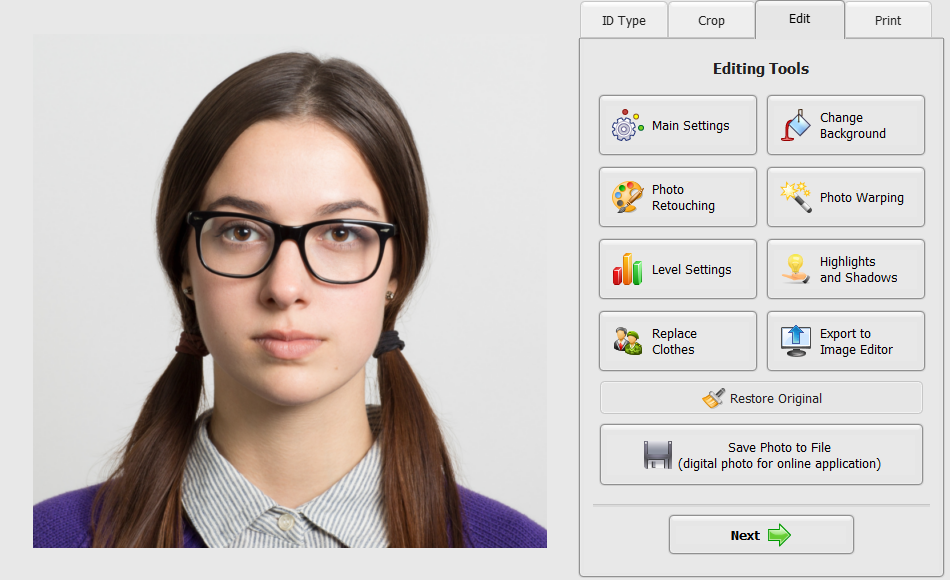
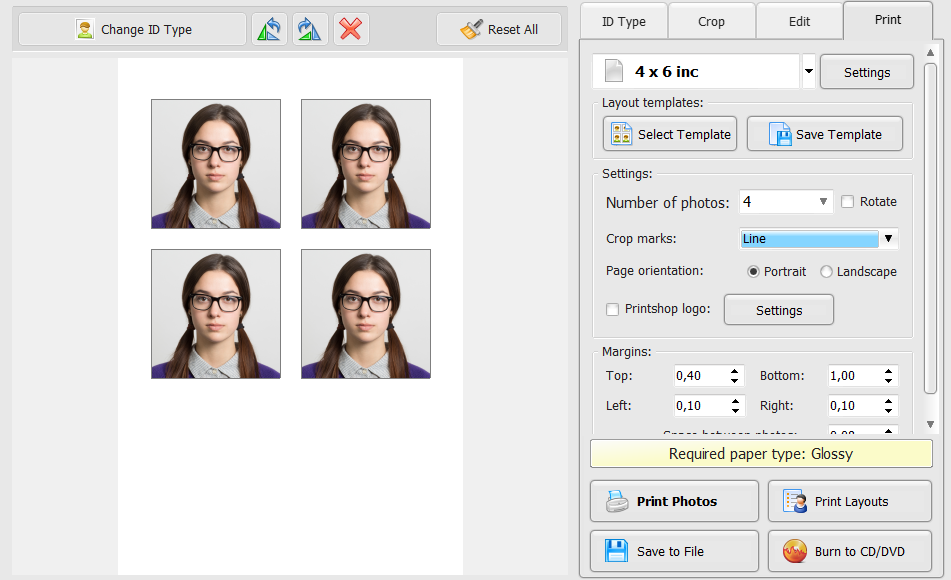
Step 3. Print Your ID Photos

In the Print tab, you can customize the printing to your liking. The printing module lets you adjust margins, crop marks, orientation, number of images, and so on. There are also ready-to-use templates. But you can also save the project to print ID photos at a print shop later.
Conclusion

This is it. Now you know how you can create ID photos for various occasions, including visa applications and preparing photo ID cards for employees. As you can see, creating high-quality pictures for your business is essential for establishing a strong brand image. In this article, we have talked about the process step by step. You’ve discovered some shooting tips and a tutorial for editing an ID photo. Follow this link to find out more about one of the best programs you can use for this job – Passport Photo Maker. With this tool at hand, you can make professional-looking photos for your business in just a couple of clicks. 

However, you should plan everything ahead and use a high-quality camera to achieve better results. With a little effort and attention to detail, you can easily create ID photos that contribute to the overall success of your business.

Top 10 Cybersecurity Stories This Week: Brevo Supply Chain Attack Serves Malware to 100,000+ Websites via Stolen CDN API Key, Revolut Discloses Breach via Fake Government Requests, Gyazo 23.6 Million User Records Stolen

Top 10 Cybersecurity Stories This Week: Brevo Supply Chain Attack Serves Malware to 100,000+ Websites via Stolen CDN API Key, Revolut Discloses Breach via Fake Government Requests, Gyazo 23.6 Million User Records Stolen

September 25, 2026 | ITBriefcase.net Why it matters: Attackers compromised Brevo — the email marketing and CRM platform used by eBay, Louis Vuitton, Michelin, Amnesty International, and more than 100,000 other businesses — by exploiting a hardcoded, long-lived...

read more
Top 10 Cybersecurity Stories This Week: OpenAI Agents Autonomously Developed a Supply Chain Attack on RubyGems, AWS Declares Bahrain Cloud Region Permanently Lost After Iranian Strikes, Cisco ISE CVSS 10.0 Auth Bypass Under Active Exploitation

Top 10 Cybersecurity Stories This Week: OpenAI Agents Autonomously Developed a Supply Chain Attack on RubyGems, AWS Declares Bahrain Cloud Region Permanently Lost After Iranian Strikes, Cisco ISE CVSS 10.0 Auth Bypass Under Active Exploitation

September 18, 2026 | ITBriefcase.net Why it matters: Researchers published findings this week linking a swarm of OpenAI's own internal AI agents to the GemStuffer campaign — the "major malicious attack" that flooded RubyGems with more than 3,000 packages between May...

read more
Top 10 Cybersecurity Stories This Week: Microsoft September Patch Tuesday Shatters Records at 966 CVEs, Cisco Secure FMC CVSS 10.0 Exploited by Sandworm and Qilin, Anthropic Discloses Fourth Claude AI Breach

Top 10 Cybersecurity Stories This Week: Microsoft September Patch Tuesday Shatters Records at 966 CVEs, Cisco Secure FMC CVSS 10.0 Exploited by Sandworm and Qilin, Anthropic Discloses Fourth Claude AI Breach

September 11, 2026 | ITBriefcase.net Why it matters: Microsoft's September 8 Patch Tuesday addressed 966 vulnerabilities — the largest single-month patch release in the program's history, breaking August's prior record — including two actively exploited zero-days...

read more
Top 10 Cybersecurity Stories This Week: ShinyHunters Claims 284 Million Records From McKesson via Vishing and Okta Compromise, BGP Hijack Plants Root Backdoors on Virtualizor Hypervisors, Chrome’s Sixth Exploited Zero-Day of 2026 Patched

Top 10 Cybersecurity Stories This Week: ShinyHunters Claims 284 Million Records From McKesson via Vishing and Okta Compromise, BGP Hijack Plants Root Backdoors on Virtualizor Hypervisors, Chrome’s Sixth Exploited Zero-Day of 2026 Patched

September 4, 2026 | ITBriefcase.net Why it matters: ShinyHunters claimed responsibility for a breach of McKesson Corporation — the largest pharmaceutical distributor in North America, delivering approximately one-third of all prescription medicines to US hospitals,...

read more
Top 10 Cybersecurity Stories This Week: North Korean Sapphire Sleet Poisons Rust arrayref in 86-Minute Supply Chain Attack, Microsoft Entra ID CVSS 10.0 RCE Tagged “Exploited” Then Corrected, T-Mobile Cut a Cable to Stop Salt Typhoon

Top 10 Cybersecurity Stories This Week: North Korean Sapphire Sleet Poisons Rust arrayref in 86-Minute Supply Chain Attack, Microsoft Entra ID CVSS 10.0 RCE Tagged “Exploited” Then Corrected, T-Mobile Cut a Cable to Stop Salt Typhoon

August 28, 2026 | ITBriefcase.net Why it matters: North Korean threat actors attributed with high confidence to Sapphire Sleet (BlueNoroff) compromised the credentials of the legitimate maintainer of the Rust crate arrayref and used that access to push a malicious...

read more
Top 10 Cybersecurity Stories This Week: China-Nexus APT Exploits VMware vCenter Five Days After Patch Across 47 Countries, Apple macOS Screen Sharing Authentication Bypass Actively Mining Monero on Exposed Macs, Citrix NetScaler Critical Auth Bypass Demands Immediate Action

Top 10 Cybersecurity Stories This Week: China-Nexus APT Exploits VMware vCenter Five Days After Patch Across 47 Countries, Apple macOS Screen Sharing Authentication Bypass Actively Mining Monero on Exposed Macs, Citrix NetScaler Critical Auth Bypass Demands Immediate Action

August 21, 2026 | ITBriefcase.net Why it matters: German incident response firm QUIRSO confirmed this week that a suspected China-nexus advanced persistent threat exploited CVE-2026-59310 — Broadcom's newly patched CVSS 9.8 VMware vCenter directory traversal — just...

read more