


Featured article by Uzair Nazeer
 Photo by Flex Point Security Inc. on Unsplash
A large number of applications are currently being deployed, and each and every one of our tasks is now being digitized. But how can businesses deal with the security requirements of the data they are collecting through these applications?
Dynamic application security testing (DAST) is a process that is carried out by companies to ensure the safety of their customers’ data in an effective and time-saving manner.
DAST is a form of black-box application security testing in which the tests are carried out either manually or with the assistance of DAST tools. Application security testing is essentially performed to test the overall security posture of an application. To carry out such testing effectively, we need to follow a couple of different steps, such as the correct gathering of information and the configuration of our tools.
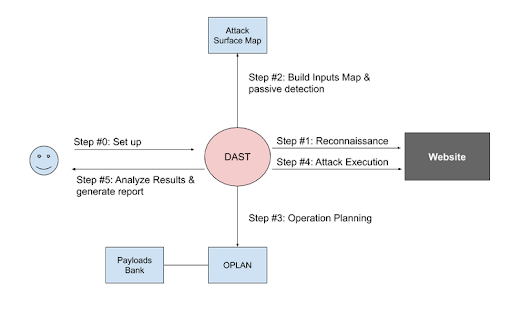
DAST simulates external attacks on an application while it is still operating to search for security flaws. It examines an application’s public interfaces to search for vulnerabilities and flaws with the goal of breaking into the system from the outside.
These tools or penetration testers engage with the application by providing input to the application in the same way that they would if they were emulating the use of the application by an external user rather than undertaking a code review.
Identify All the Assets
An organization might have any number of domains, subdomains, and IP addresses available to them at any given time. Therefore, to carry out the appropriate DAST, it is vital that each and every asset be identified and then tested. This should be done to ensure that the testing is carried out correctly.
As a result of the fact that some of the assets could not have as much suitable protection as others, which increases the attack surface, it is essential that all of these assets be examined in an appropriate manner. Therefore, the identification of assets needs to take place at the first step of the process.
Some of the open source tools, like Shodan, as well as any subdomain enumeration tools, like crt.sh, can be utilized to perform identification in a quick and straightforward manner. These supply the helpful information that is required regarding the organization and its field.
Perform Crawl and Then Audit
It is imperative that, if we are performing DAST utilizing DAST tools, we first carry out the crawling and then proceed to carry out a list-based scan. This is the order in which we should always perform these two steps.
The vast majority of the time, all we do is submit the URL and record the login information. However, if the website has any out-of-context URLs such as external scripts, it is likely that the tool may begin scanning those as well, at which point it will no longer be within the scope of its analysis. Not only would this make the scanning take longer, but it may also produce results that were not anticipated.
Crawling can easily be done with tools such as Burp or OWASP ZAP. These tools just crawl the website in their most basic form, after which we can export all of the application’s URLs. Remove any of the URLs that might not be in the scope, and then feed the list into the DAST tool. The DAST tool will only scan the URLs that are supplied along with any inputs or information necessary to carry out the testing in an effective manner.
Conclusion
When we discuss DAST, we should ensure that it is carried out in the most effective manner. It is necessary that, by adhering to a couple of best practices, we can make this process more effective and save ourselves some time because we are testing the whole security posture of the application. There are a couple of tools that can do that efficiently. Hence, they need to be utilized in a proper manner with proper expertise.


